Hardware, Configuration & Operation
The NLink Bidirectional CAN-to-USB Adapter enables seamless integration of NMotion components with USB-equipped host systems by bridging CAN-based peripherals and the main control system. Powered directly via USB, it features two CAN ports and a USB Type-C interface, supporting a CAN bus baud rate of upto 1Mbps (default 500kbps). The adapter runs a modified CANable firmware and provides direct communication and comprehensive device control through our proprietary Software SDK. It also supports SocketCAN with SLCAN ASCII protocol, allowing standard tools such as slcand to be used for bringing up and managing the CAN interface on compatible operating systems.
Hardware
Considering the hardware part, NLink Adapter has two CAN ports on one side to connect CAN Bus based devices, and an USB-C port on the other side to connect it to PC / Laptop / SBCs / Anything with an USB port.
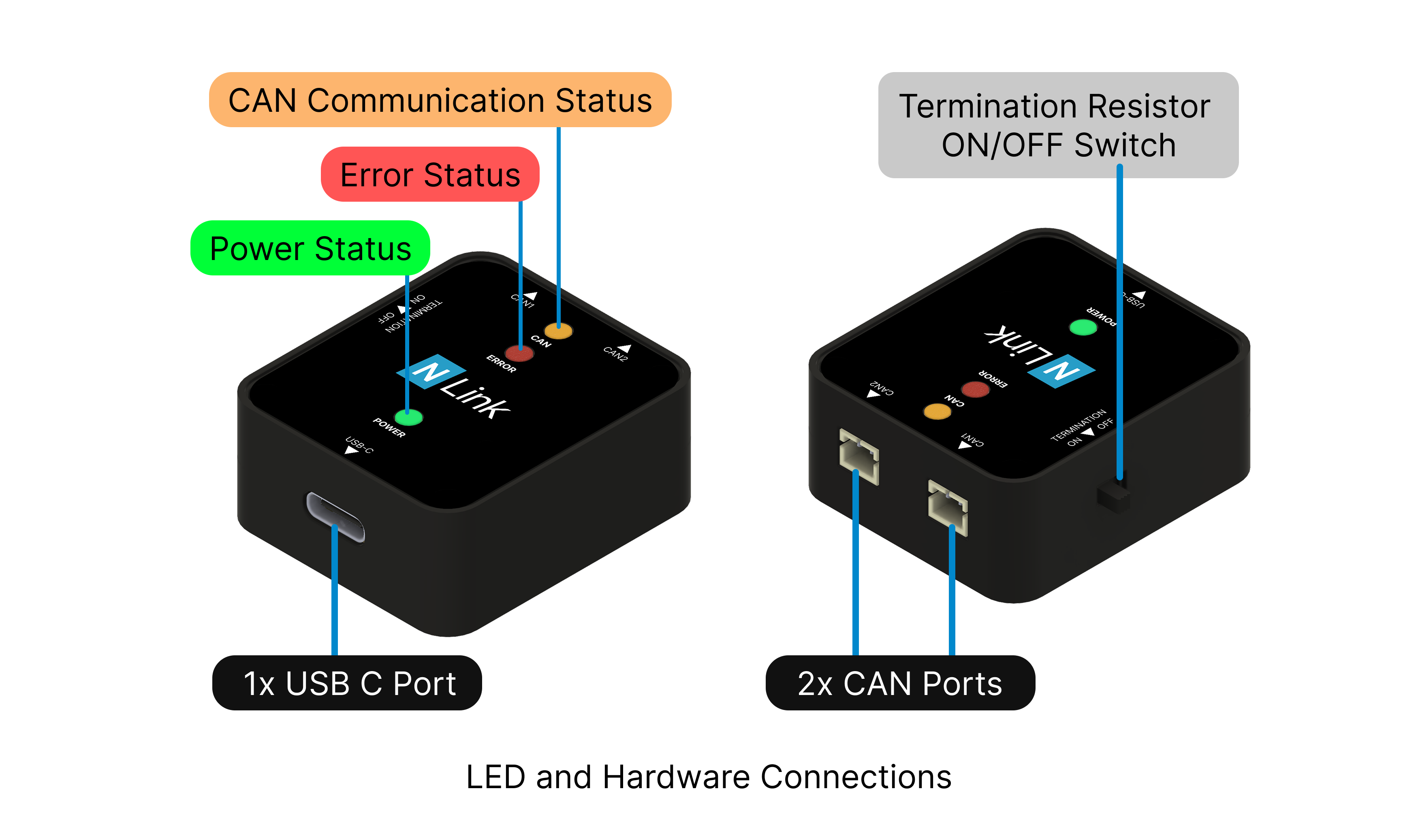
It also has a set of three LEDs each for power status (GREEN), CAN communication status (ORANGE) and for error status (RED):
- Power Status: Turns ON when the board is powered.
- CAN Communication Status: Blinks when there are incoming and outgoing bytes in the CAN Bus.
- Error Status: Turns ON when an error is triggered.
Drawing
All dimensions are in mm


Configuration
Version Information
The firmware version identifies the software currently running on the adapter, while the hardware version identifies the physical revision of the device.
Getting version information through the NMotion Transport Library and NMotion CLI Tool is only supported when the NLink Adapter is operating in Native USB Mode.
The following APIs can be used to retrieve the firmware and hardware versions of the adapter:
CAN Bus Configuration
By default, the NLink Adapter is configured to operate at a CAN bus baud rate of 500 kbps, which is suitable for most NMotion devices and applications. However, the adapter also supports other standard CAN baud rates up to 1 Mbps, enabling higher communication throughput and lower message latency in applications that require faster data exchange.
The CAN bus baud rate can be modified programmatically through the NMotion SDK APIs or via NMotion CLI. When changing the baud rate, ensure that all devices connected to the same CAN network are configured to use the identical baud rate, as mismatched settings will prevent successful communication.
CAN bus baud rate configuration through the NMotion Transport Library and NMotion CLI Tool is only supported when the NLink Adapter is operating in Native USB Mode.
CAN Bus Configuration feature is available on NLink Adapters running Firmware version 0.1.7 or newer. Support for these features requires NMotion Transport Library v0.1.10-beta or newer or NMotion CLI Tool v0.1.7-beta or newer.
The following APIs can be used to read and configure the CAN bus baud rate of the adapter:
Saving Configuration
Once the desired configuration has been applied, it can be permanently stored in the adapter's non-volatile memory. This ensures that the configured CAN bus baud rate is retained across power cycles, reconnects, and system restarts, eliminating the need to reconfigure the adapter each time it is powered on.
Saving the configuration will automatically reboot the adapter for the changes to take effect.
The configuration data is stored in the microcontroller's onboard EEPROM memory. To prolong the memory's lifespan, it is recommended to limit the frequency of configuration updates, as EEPROMs have a finite number of write cycles.
Saving configuration through the NMotion Transport Library and NMotion CLI Tool is only supported when the NLink Adapter is operating in Native USB Mode.
Saving Configuration feature is available on NLink Adapters running Firmware version 0.1.7 or newer and Hardware version 2.x. Support for these features requires NMotion Transport Library v0.1.10-beta or newer or NMotion CLI Tool v0.1.7-beta or newer.
The API functions involved in this configuration are as follows:
Operation
To use the system, connect the NMotion Components to the Adapter's CAN Bus interface, then plug the Adapter's USB port into your computer or device, and finally confirm proper power-up by checking that the green LED on the adapter illuminates. The CAN communication LED also blinks 4 times, signifying a successful connection and readiness for operation.
If only one CAN port from the adapter is being used and you're facing issues with the communication part, make sure to turn on the termination resistor switch to enable the termination resistor on the Adapter. This is crucial for a proper CAN bus communication.
Once connected, the adapter can be operated in one of the following modes depending on the application requirements.
Native USB Mode
In this mode, the adapter is accessed directly over USB without requiring any additional CAN interface configuration on the host system. Once connected, applications can communicate with the adapter using the NMotion Transport Library or interact with connected devices through the NMotion CLI Tool.
Within the NMotion Transport Library SDK, communication with the adapter is handled through the USBInterface class, which provides a platform-independent interface for device discovery, connection management, and data exchange. This mode is supported on both Windows and Linux and is the recommended approach for most users due to its straightforward setup and seamless integration with the NMotion software ecosystem.
Typical use cases include device configuration, monitoring, diagnostics, firmware updates, and real-time control of NMotion components.
SocketCAN Mode
The adapter can also operate as a SocketCAN-compatible CAN interface on Linux systems. In this mode, the adapter communicates using the SLCAN (Serial Line CAN) protocol and is attached to the Linux SocketCAN subsystem, allowing it to appear as a standard CAN network interface to the operating system. Once configured, the adapter can be accessed using standard Linux CAN utilities and third-party applications that support SocketCAN, such as slcand, ip, candump, and cansend. This enables seamless integration with existing Linux CAN workflows for development, debugging, monitoring, and diagnostics.
Within the NMotion Transport Library SDK, communication through a SocketCAN interface is handled using the CANInterface class. Applications built using the SDK can therefore communicate with NMotion devices through the Linux CAN stack in the same manner as any other SocketCAN-compatible hardware.
This mode is supported exclusively on Linux and is particularly useful for users who wish to integrate NMotion devices into existing SocketCAN-based software ecosystems, perform low-level CAN bus analysis, or leverage the extensive tooling available within the Linux CAN framework. However, SocketCAN mode is not supported by the NMotion CLI Tool, which communicates only through the adapter's native USB interface.
 NMotionTM is a sub-brand of Nawe Robotics